


 Written by Dilip Kumar Patairyastaff writerEdited by Rahul Nambiampurathstaff editor
Google Chrome’s 4GB AI model shows why browser trust matters for crypto security
MagazinePublishedMay 9, 2026
Chrome’s Gemini Nano controversy highlights why browser trust, AI transparency and extension security matter for crypto users and wallet safety.

1. Why crypto users are suddenly questioning their trust in Google Chrome
A web browser is generally viewed as a simple tool to surf the internet. In the cryptocurrency space, however, browsers have become critical gateways that connect users directly to digital wallets, trading platforms and decentralized applications.
This is exactly why recent reports about Google Chrome quietly downloading a large AI model onto users’ devices have sparked serious conversations around trust, transparency and overall digital safety.
The core issue is not the AI technology itself, but a growing question for crypto users: How much confidence should we really have in the everyday software that stands between us and our digital assets?
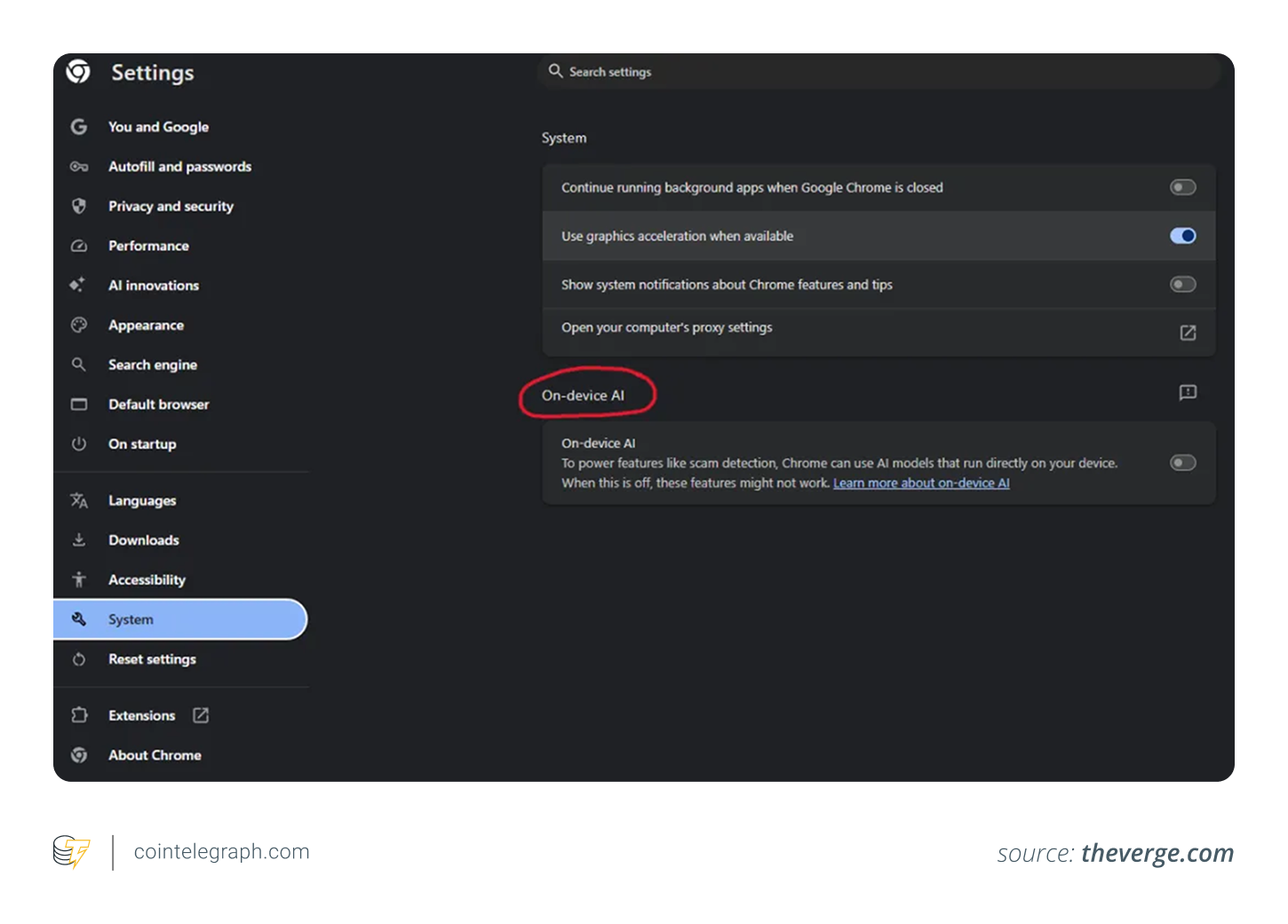
The discussion gained traction after privacy advocate Alexander Hanff, known as “That Privacy Guy,” highlighted that Chrome was downloading a substantial AI-related file in the background without clear, upfront user notification. According to his observations, the browser created a directory called OptGuideOnDeviceModel and pulled down a multi-gigabyte weights.bin file associated with Google’s Gemini Nano model.
The file took up several gigabytes of storage and would often reappear even after being manually deleted, unless specific AI features were turned off in the browser settings. This behavior drew attention because most people had no idea their browser was automatically installing large AI components locally.
2. Google’s explanation for the on-device model
Google developed Gemini Nano as a compact, lightweight AI model built specifically to run locally on users’ devices instead of relying solely on remote cloud servers.
The company intends for it to power several built-in browser capabilities, including:
- Detecting potential scams and phishing attempts
- Assisting with text composition and editing
- Generating intelligent summaries of web content
- Enabling smarter, AI-driven browsing experiences
- Providing developer tools and APIs for on-device AI tasks
In principle, processing these tasks locally can enhance user privacy, since less data needs to be transmitted to external servers. This approach reflects a wider industry shift in which modern browsers are no longer simple tools for viewing websites. They are becoming sophisticated, AI-powered platforms.
Did you know? Modern crypto wallet extensions have become so powerful that many now work like compact financial dashboards inside the browser, letting users store assets, swap tokens and access other on-chain services without opening separate desktop software.
3. Why the situation made users worried
While the large file size contributed to the backlash, the main point of debate was transparency. Critics pointed out several issues:
- Users received little to no clear notification before the large download started.
- A multi-gigabyte AI model suddenly appeared on devices without warning.
- Many people had no idea what the files were or why they were there.
For those who prioritize privacy, any automatic background installation of large files can feel invasive, even when the software comes from a trusted vendor.
The issue also raised questions about whether the rollout met data protection standards in regions like Europe. Given Chrome’s enormous user base worldwide, even small decisions can significantly affect internet bandwidth, battery life and local storage usage.

4. What Gemini Nano really is
Gemini Nano is Google’s compact, on-device artificial intelligence model built to run directly on laptops, smartphones and other personal hardware.
Instead of sending every request to distant cloud servers like larger AI systems do, Nano handles certain tasks locally on the user’s own device. This design offers:
- Quicker response times with less lag
- Lower reliance on constant internet connectivity
- Improved privacy for specific operations, since data stays on the device
The sizable weights.bin file that researchers flagged contains the model’s large collection of trained parameters, which allow the AI to understand and generate responses. Because modern AI systems learn from huge datasets, these model files often end up being several gigabytes in size.
5. Why this matters for crypto users
The crypto sector depends on web browsers far more than many users realize. For the average user, nearly every interaction with crypto starts in the browser. These activities include launching wallet extensions, signing transactions, accessing exchanges and more.
This change means browsers are no longer just neutral windows for viewing websites. They have become essential components of the crypto technology stack.
A browser sits in a powerful position where it can interact with:
- Browser extensions
- File downloads
- Web addresses and redirects
- Input forms and autofill data
- Clipboard contents
- Wallet connection requests
Because of this deep integration, the level of trust users place in their browser has a direct impact on the overall security of their digital assets. Any unexpected behavior in widely used browsers like Chrome can therefore raise legitimate concerns across the entire crypto ecosystem.
Did you know? Browser phishing attacks have become increasingly sophisticated in crypto, with some fake websites visually copying legitimate exchanges and wallet interfaces almost pixel for pixel.
6. Why browser trust is critical in crypto
Crypto users have learned to stay highly alert to anything unusual happening online. The space is full of warnings about common threats like:
- Fake wallet interfaces and pop-ups
- Phishing websites that mimic legitimate platforms
- Rogue browser extensions
- Malware that hijacks clipboard addresses
- Bogus airdrops and giveaways
- Sophisticated wallet-draining scams
Against this backdrop, even a legitimate browser quietly downloading large AI files in the background can feel unsettling, regardless of whether the files are harmless.
The real concern is not necessarily that Gemini Nano itself is dangerous. It is the broader principle.
Crypto security culture is built on transparency, clear user consent and the ability to verify what software is doing. When everyday tools act in opaque or unexpected ways, user confidence can erode quickly.
7. The potential upside: AI as a defense against scams
On the brighter side, integrating on-device AI into browsers could improve security for crypto users. Scams in the industry have grown more advanced and frequently involve:
- Counterfeit support portals
- Impersonation sites pretending to be official projects
- AI-generated phishing messages and websites
- Fraudulent token launches
- Advanced social engineering tactics
A local AI model running inside the browser could help by:
- Automatically flagging suspicious websites in real time
- Alerting users to potential scam patterns
- Detecting malicious behavior directly on the device
- Reducing reliance on external servers for threat detection
Because the analysis happens locally, many of these protections can work without constantly sending browsing data to cloud services. This kind of built-in intelligence could become a valuable layer of defense, helping users navigate the risky crypto space more safely.
Did you know? Hardware wallets are considered safer partly because they isolate private keys from browsers and internet-connected environments, reducing exposure to browser-based malware and phishing attacks.
8. The downside: How AI integration can increase browser risks
Adding advanced AI features to browsers introduces new layers of complexity and potential vulnerabilities. These smarter systems interact closely with many sensitive areas, such as:
- Actual webpage content
- User inputs and prompts
- Local hardware resources
- Installed extensions
- Personal browsing history
- Core security configurations
Security experts have already flagged rising threats such as harmful AI-focused browser extensions and counterfeit AI utilities built to harvest login details or trick users. As browsers grow more capable and intelligent, they also become more tempting targets for attackers.
This dynamic is particularly important for crypto users, since browsers often serve as the direct bridge between people and their digital assets.
The incident highlights a major shift in how users need to think about digital security. While users stand to gain from improved tools like real-time scam detection, proactive alerts and stronger browsing safeguards, they also need to become more aware of:
- Which programs and models are running locally on their devices
- What kind of data their browser is handling
- Which features are active by default
- How extensions and plugins actually behave
- What level of access AI components are granted
Choosing the right browser and configuring its settings is quickly becoming a core part of any serious crypto security approach.
9. Why wallet extensions get exposed
Browser-based crypto wallets run inside the browser environment, which means any vulnerabilities in the browser itself can directly affect wallet safety. Possible threats in this setup include:
- Rogue or compromised extensions
- Deceptive transaction approval screens
- Overlay phishing attacks
- Misleading AI-generated page summaries
- Clipboard tampering techniques
When examining this incident, the broader issue is the growing importance of transparency and accountability in browsers as they incorporate powerful AI features.
10. How to stay safe as browsers get smarter
As web browsers transform into AI-enhanced platforms, crypto users should treat browser security with the same level of caution they apply to their wallets. Cautious habits, disciplined extension management and close attention to browser configurations can go a long way in minimizing unnecessary risks.
Check your browser’s AI settings
Take time to explore Chrome’s on-device AI options and visit internal pages like chrome://on-device-internals. This helps you see exactly what AI components are installed and running locally on your device.
Maintain strong browser and wallet practices
Crypto users should adopt these habits:
- Uninstall any extensions you no longer need
- Be careful with new AI-related or crypto add-ons from unknown sources
- Always keep your browser and wallet software up to date
- Double-check URLs manually before approving any wallet connections
- Use dedicated browser profiles or windows strictly for crypto activities
Safeguard high-value assets
For larger holdings, consider these extra precautions:
- Rely on hardware wallets for significant amounts
- Never store seed phrases or private keys in digital form
- Keep everyday web browsing completely separate from crypto operations
- Use isolated devices or virtual environments for sensitive wallet activity, where practical
11. Why AI is moving faster than user trust
This is part of a much bigger change in how browsers work. They are no longer just tools for opening webpages. They can now analyze content, spot potential scams, generate summaries, run local AI models and interact more deeply with user behavior.
This fast shift brings up practical questions, such as:
- Which features should require clear user approval before activation?
- How transparent should large background downloads be?
- What information stays strictly on the device?
- Who is responsible for independently auditing AI behavior in browsers?
- How much control should users ultimately have over these systems?
These issues carry extra weight in crypto, where users frequently navigate high-stakes environments involving irreversible financial decisions. Maintaining awareness and control over your browser setup is quickly becoming an essential part of protecting your digital assets.


Subscribe to daily byte-sized crypto news from Cointelegraph
Cointelegraph publishes long-form journalism, analysis and narrative reporting produced by Cointelegraph’s in-house editorial team with subject-matter expertise. All articles are edited and reviewed by Cointelegraph editors in line with our editorial standards. Some articles contain affiliate links, from which Cointelegraph may earn a commission. These relationships do not influence which products we review or our editorial conclusions. Content published in here does not constitute financial, legal or investment advice. Readers should conduct their own research and consult qualified professionals where appropriate. Cointelegraph maintains full editorial independence.
More on the subject